
Convert manufacturing drawings into 3D models
MASSLAGE creates a 3D model from manufacturing drawings supplied as PDF, TIFF or PNG and delivers STEP, STL and DXF files. A correction list records open items with their location on the drawing and documents assumptions and derived dimensions.
A sheet runs unattended in 30 to 60 minutes. You then review the model and the correction list.
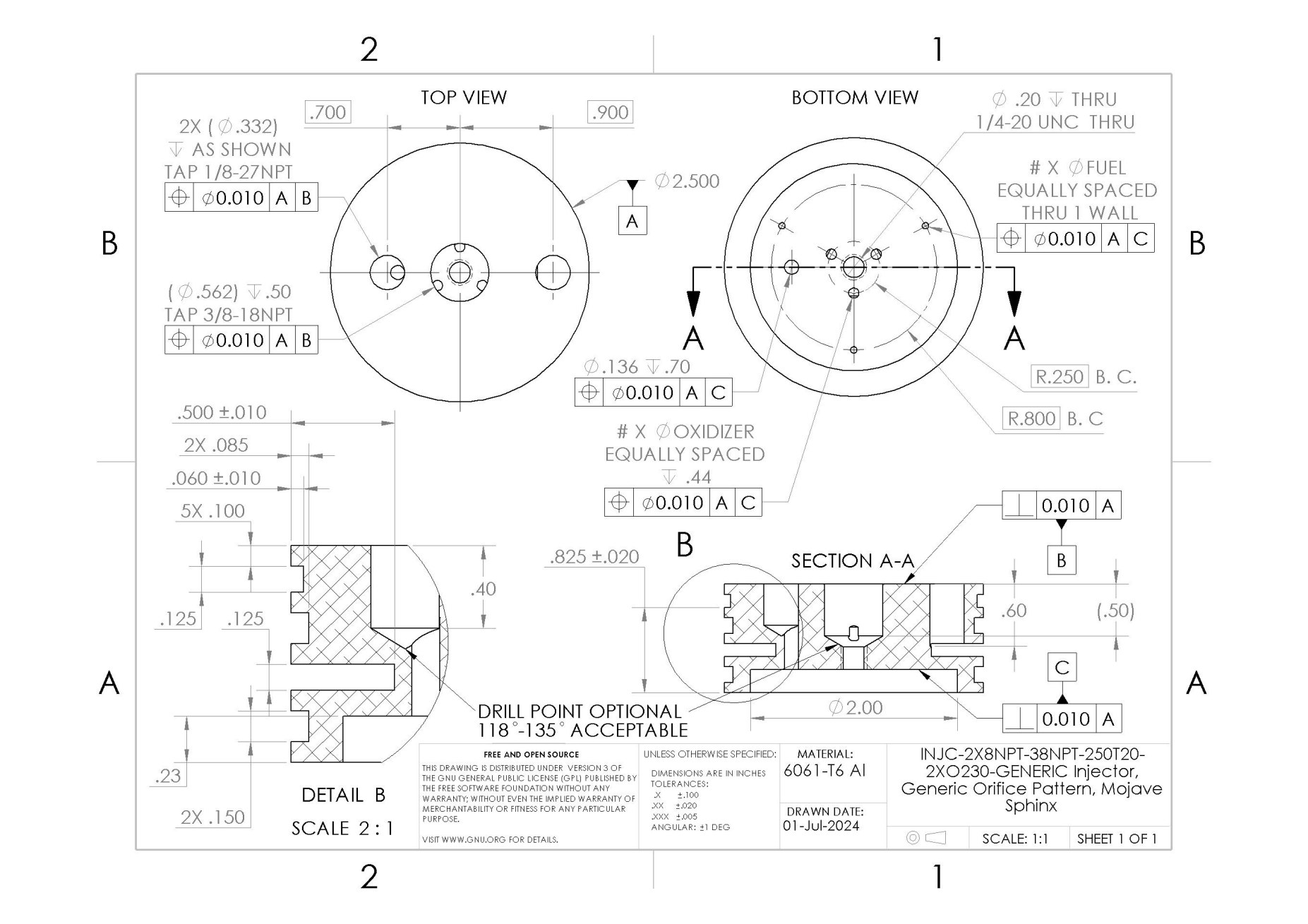
Compare drawing and model on real parts
Three manufacturing drawings from the open-source engine Mojave Sphinx, next to them the time-lapse of the modelling in FreeCAD and the finished 3D model from the STEP file. Measured values come from the STEP files; the correction-list entries are derived from the drawings. Download the STEP and STL files and open them in your CAD system.
Deliverables
Review the result files and reports
For each generated model you receive the CAD files, a 3D preview, a measurement report and a correction list. The job status states whether the model is complete or provisional. If no model is produced, you receive the reason.
| Output | Content |
|---|---|
| STEP (AP214) | The STEP file contains a solid body. Assumptions and variants that were not built are listed in the file header. |
| STL and DXF | You receive an STL file for viewing and printing and a DXF file with a section through the model. |
| 3D preview | In the browser you can rotate the model and view it with section planes in the X, Y and Z directions. |
| Measurement report | The measurement report lists the re-measured cylinders, cones and planes of the finished file. |
| Correction list | The list contains findings with their location on the drawing, actual and target values and the related CAD action. It also records assumptions, derived values and variants that were not built. |
| Job status | Each job receives the status “complete”, “provisional” or “no model”. A provisional model requires a person to review the correction list. If no model is produced, the reason is stated. |
Earlier jobs and results remain available in the web application. During processing the interface shows the current progress.
Check where each model dimension comes from
Dimensions in the model are taken from printed values on the drawing, derived from them or declared as a reasoned assumption. In a dimension chain, a position may result from the overall length minus a datum dimension, for example.
The correction list documents assumptions, derived values and variants that were not built, each with its location on the drawing, so you can go straight to those points during review.
Process
Submit your drawing for processing
You upload the drawing in the web application and follow the job there. After processing, the status and the results are ready for review.
Upload the drawing
You can submit PDF, TIFF and PNG files. MASSLAGE processes vector PDFs and raster scans; several sheets are read as one set.
Follow the job
Processing runs unattended. You can see the current progress in the web application.
Review model and correction list
When a model is available, you can view it in the 3D preview and check the correction list against the drawing. For a provisional model this review is required.
Download the result files
A generated model comes with STEP, STL and DXF files and the reports. Jobs and results remain available in the history of the web application.
Use cases
Create models from drawings of mechanical single parts
MASSLAGE is designed for single parts from mechanical manufacturing: turned parts with shoulders, bores, tapers, grooves and weld preparations, and plates and blocks with hole patterns, pockets and cut-outs. Dimension chains over datums, angle chains, bolt circles and reference dimensions are carried over as formulas.
Bring existing drawings into design engineering
MASSLAGE is intended for design engineers who need a model from legacy stock or customer drawings. You receive a STEP solid and a correction list for review.
Use models in process planning
Process planning receives the model, a DXF section and the related reports. The correction list shows which drawing entries need attention during review.
Process customer drawings as a supplier
Suppliers and job shops can submit manufacturing drawings as PDF, TIFF or PNG. Besides the model, the result includes a correction list with locations on the customer drawing.
Convert drawings from legacy archives into models
MASSLAGE also processes raster scans of single-part drawings. Assumptions and derived dimensions are recorded in the correction list; the status stays attached to each job.
Operation
Choose the operating model for your company
MASSLAGE is a self-contained web application operated in the browser. A separate instance is provided for each customer.
Private Computing
Processing runs on a private instance, without cloud services. As Enterprise and on-premise also on your own server; jobs and results then stay stored there.
Cloud Computing
If your drawings may be processed with cloud services, we connect them. This makes 40 sheets per month for €2,200 possible.
Operation in the browser
In the web application you follow the progress of your jobs and retrieve earlier jobs and results. No further platforms are required.
Pricing
Three ways to your 3D models
All prices net, excluding VAT.
Private Computing
For drawings that must not leave your company.
- Full result per sheet: STEP, STL, DXF, measurement report, correction list
- Processing on a private instance, without cloud services
- Each further sheet: €490
Cloud Computing
When your drawings may be processed with cloud services.
- Processing with connected cloud services
- Each further sheet: €59
- History of all jobs in the web application
Enterprise and on-premise
For operation on your own server and larger archives.
- Jobs and results stay on your system
- Installed as a system service
- Scope agreed in conversation
A sheet runs unattended in 30 to 60 minutes. Your team then reviews the model and the correction list.
Data sheet
Check the technical data
Inputs, outputs and limits of the application at a glance.
| Property | Value |
|---|---|
| Input | PDF, TIFF and PNG; vector PDFs and raster scans; several sheets as one set |
| Scope | Mechanical single parts; one part per sheet; no assemblies |
| Output | STEP (AP214) as a solid, STL for viewing and printing, DXF as a section |
| Accompanying documents | 3D preview, measurement report and correction list |
| Origin of dimensions | Printed drawing values, values derived from them or reasoned assumptions |
| Measurement report | Re-measured cylinders, cones and planes of the finished file |
| Job status | Complete, provisional or no model with reason; a provisional model requires review of the correction list |
| Operation | Self-contained web application; private instance (Private Computing), with cloud services (Cloud Computing), own server as Enterprise and on-premise on request |
| Processing time | 30 to 60 minutes per sheet, unattended |
| Threads | Represented as nominal bores |
| Roughness and tolerance frames | Recorded in the correction list, not as PMI in the STEP file |
| Native CAD files | No SolidWorks or AutoCAD files with a feature tree |
| Provisional result | Proposal with correction list; no manufacturing release |
Questions
Questions before your first job
Which parts can be processed?
MASSLAGE processes mechanical single parts: turned parts with shoulders, bores, tapers, grooves and weld preparations, and plates and blocks with hole patterns, pockets and cut-outs. Combinations are also covered. One single part is processed per sheet; assemblies are not supported.
Which file formats can you submit?
You can submit PDF, TIFF and PNG files. MASSLAGE processes vector PDFs and raster scans. Several sheets are read as one set.
What do you receive when drawing information is incomplete?
Assumptions are documented in the correction list with a reason and location. A provisional model is a proposal whose correction list you must review. A job can also receive the status “no model”, in which case a reason is given.
Is a provisional model released for manufacturing?
No. A provisional model is a proposal with a correction list and is not a manufacturing release. The list must be reviewed by a person. It contains findings with location, actual and target values and the related CAD action.
Where are your jobs and results stored?
When run on your own server, jobs and results stay stored there. With Private Computing processing runs on a private instance, with Cloud Computing via connected cloud services. Earlier jobs and results remain available in the web application.
How do you check suitability for your drawings?
With Private Computing you submit ten typical sheets from your company and compare the results with your existing model. The price is €4,900 net, processing runs on a private instance.
Next step
Test MASSLAGE with your own drawings
Submit ten typical sheets with Private Computing. Compare the generated models with your existing model and review the related correction lists.
Tell us which part families you manufacture and in what form your drawings exist. We reply within two working days with an offer and a proposed date.
BReact GmbH, Vienna · office@breact.ai